Monday, September 26, 2022

RV Computer Science, Robotics, & ELD Week 9/26 - 30/22

 Hi all,

The last week of September has come.  We'll be finishing several projects & starting new ones so keep watching for updates on this blog.

Space Note:

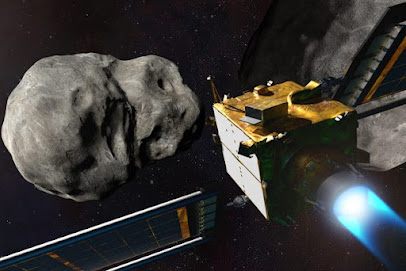
DART Project finishes on Monday.  Watch the end of the first part of the mission here.


Period 2 & 3

We'll be finishing our laptop project this week.

  1. Reassemble your laptop and check to make sure it works.  Troubleshoot any problems.
  2. Put together your slideshow paying close attention to the parts and what they do.
  3. Find the rubric for your slideshow here.
Search for your tool names at the link below.


Period 5
Monday - Review Videos & writing.  Finish if needed

Tuesday - We'll be logging into our new on-line program today.

Method 1 -

1. Click on this link to get to Clever

2. Find, heart, & click on this link

3. Look for your new Task


_______________________________________________________________________


Method 2 - 

1. Click on the link below

2. Click on the Sign in button on the upper right side & click on Teacher Student button

3. Go to the box shown below & type in Rio Ele...  click on Rio Elementary

4. Click the "Sign in with your school district" button

5. You are in.  Look for your first assignment.


Wednesday - Testing in Elit

Thursday - Testing in Elit

Friday - Testing in Elit & Rootbeer Floats


Period 6 & 7

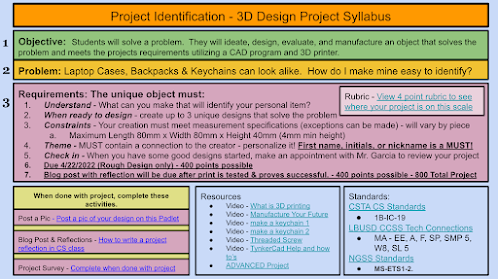
Project Identification will continue this week.  I will be meeting with each of you this week to answer questions and review your projects.  

We will also be looking at measurement & the metric system and how it relates to your project.


From the Miramar Air Show


Sunday, September 18, 2022

RV Computer Science, Robotics, & ELD Week 9/19 - 23/22

Welcome Folks,

As a school, we will be celebrating Internation Day of Peace on Wednesday.  There will be many activities.  But what is peace and what does it look like?


Monday

View the video on your own.  As a class, watch the video again & discuss the questions below.

Internation Day of Peace Sept 21, 2022 


What can we do to make peace?  Watch this video.


What do people in this video do to make peace & show kindness to each other?


Is it difficult to show kindness to others?


What can you do to show kindness & peace?


It all starts with our breathing!  Do the following activity as a whole class.

Tuesday

How did the International Day of Peace begin?


Do you think peace is possible?

...in the world?

...in our country?

...in our city?

...in our school?

...in our homes?


Period 2 & 3

Do the Peace Day activities first, then start on your project below.

Laptop Project - It's time to put it all back together and make it work. 

Goals for this week:

  1. Reassemble your laptop computer and check to see if it works
  2. Build your Laptop Project Slideshow including notes, images, and descriptions of how you did this & what you learned.

Do the following daily

  1. Review your jobs with your team, change them as needed
  2. The Recorder should remind the group using their notes as to where they left off last week.  Use your notes to go backward for the reassembly.  
  3. Take an inventory of your tools before and after you use them.
With your group:
  1. Start reassembling your device - Watch this for a 30 seconds - when tightening screws on any part that has more than one screw - tighten in a star pattern not one side at once!
  2. Keep detailed notes and images
  3. Use tape & a sealed container to keep track of your parts and where they go.
  4. Take pictures of the reassembly process.
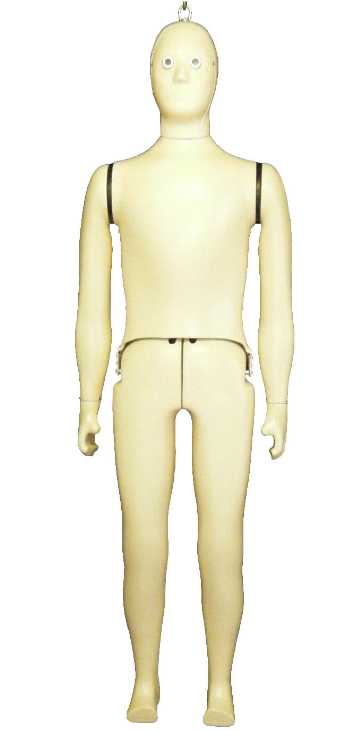
  5. Here is a link to the image below so you can name the parts


Other Resources
These resources are great to watch but will take extra time.  You can watch these at home if you are interested.


Slideshow Master Copy - click on "Make a Copy"  You will only need one presentation per group.  You need to share it so you can all work from the same copy


______________________________________________________________________________


Periods 5

English
1. Watch 2 of the following videos
2. Answer the questions on the answer page about the video.  Answer a page for each video.
3. On the back, draw what you are thinking about.

Espanol
1. Mira 2 de los videos abajo.
2. Contesta las preguntas sobre el video en la pagina. Llena un pagina para cada video.
3. Atras de la pagina, dibuja sobre los que piensas del la informacion del video

Videos in English

Mexican-born engineer pushing for more diversity in space


How an immigrant farmworker beat the odds to become a NASA astronaut


Videos en Espanol

Katya Echazarreta, la primera mexicana en viajar al espacio


De los campos a la NASA, la historia del astronauta mexicano José Hernández


Extra - Just for Fun


How does the International Space Station work?


_________________________________________________________________________________


Periods 6 & 7
 
Do the Peace Day activities first, then start on your project below.

You will be starting your new 3D Design project, Project Identification, today

Key Vocabulary:
*Manufacturing
*Additive
*Automation

Design 3 different ideas that you can put on your backpack or keychain that will show that it belongs to you.  Follow the guide below.


_________________________________________________________________________
Space Out Friday

Who works for NASA?


Project Artemis - What is it?

Why Are We Going To The Moon? Click on the image

Monday, September 12, 2022

RV Computer Science, Robotics, & ELD Week 9/12 - 16/2022

 Welcome Everyone,

The International Space Station will be overhead tonight.  Here is the info:

Time: Wed Sep 14 8:03 PM, Visible: 6 min, Max Height: 79°, Appears: 10° above SW, Disappears: 14° above NE


________________________________________________________________

Laptop disassembly & reassembly is happening now in Periods 2 & 3.  Lots of discovery.  Period 5 is working on building language, while P6 & 7 are starting to work on 3D design.  Busy, Busy!


What do you think?

"Is technology helping society or hurting society?"


Here is what we will be doing this week:

Period 2 & 3

Learning laptop - We will be looking into what makes a laptop work.  Here is the plan:

:

  1. Gather your materials and tools
  2. Review your jobs with your team, change them as needed
  3. The Recorder should remind the group using their notes as to where they left off last week 
  4. Start disassembling your device
  5. Keep detailed notes and images
  6. Use tape & a sealed container to keep track of your parts and where they go.  


Slideshow Master Copy - click on "Make a Copy"  You will only need one presentation per group.  You need to share it so you can all work from the same copy

______________________________________________________________________________

Periods 5

We are going to start reading a graphic comic strip that will describe the Artemis Project.  This project will take us to the moon to live.


________________________________________

Espanol

Vamos a leer una caricatura sobre el Proyecto Artemis.  Este proyecto llevara humanidad a la luna para vivir.


_______________________________________________________________________________

Periods 6 & 7
 
We'll be starting to learn about how things are made using technology (tools made by humans to help humans)


Key Vocabulary:
*Manufacturing
*Additive
*Automation

Monday - 
  1. Today we will be creating an account in Tinkercad.  Click on your class link to get started.  
  2. Don't forget to bookmark Tinkercad in your Computer Science folder.


Tuesday - 
  1. Open up Tinkercad
  2. Let's look at the site
  3. Check out the Starters. Follow the directions below
1. open the account
2. Go to the Tinker button on the top menu
3. Select 3D Design
4. Scroll down to "Learn the Moves"
5. Start working on the guided tutorials.  It helps if she has a mouse for her computer.


_________________________________________________________________________
Space Out Friday


Project Artemis - What is it?

Monday, September 5, 2022

Computer Science & Robotics Week 9/6 - 9/9

 Welcome everyone,

We will all get started with some interesting work this week.  Here is a question for you to think about and research.   We will use this later.

"Is technology helping society or hurting society?"


Here is what we will be doing this week:

Period 2 & 3

Learning laptop - We will be looking into what makes a laptop work.  Here is the plan:

On Wednesday:

  1. Watch the following video to review what you will be doing on Thursday.  Click here to see the video
  2. Think about what job you want to do on Thursday when you start disassembling your laptop with your group of 3.  The jobs are - timekeeper/tool handler,  recorder,   technician
  3. Space Out! Look for copies of the Artemis project worksheets to end the class.


On Thursday:
  1. Look at your device and tools.  
  2. Organize jobs in your group - timekeeper/tool handler,  recorder,   technician
  3. Open this webpage to help you understand what you are seeing.
  4. Plug in your laptop to make sure it is working
  5. Unplug your laptop
  6. Talk about your plan to disassemble the device
  7. Start disassembling your device
  8. Use tape & a sealed container to keep track of your parts and where they go.  You will be reassembling this device later this week


Periods 4
Time to discover NASA for Students!

Look at this website and click on the different activities.  What can you find?


___________________________________________________________

Es tiempo que descubren NASA para alumnos en Espanol!

Quiero que investigen esta pagina de NASA.  Hay muchas actividades para aprender lo que hace NASA.  Que puedes aprender?


Periods 6 & 7
 
We'll be starting to learn about how things are made using technology (tools made by humans to help humans)


Key Vocabulary:
*Manufacturing
*Additive
*Automation

1. Watch this movie and think about questions you have.


2. What are the best things humans have made?
Check out this article to find out.  Click here to access the website

3. When done, look for the Artemis project worksheets to do.

_________________________________________________________________________
Space Out Friday
What's Up in Our Sky
Watch and discuss


Project Artemis - What is it?


Sunday, August 21, 2022

Welcome Back to School 2022/23!

 Welcome back Everyone!


Glad to have you all here!

Let's start by getting you on the class blog at 

www.riovistatech.blogspot.com


https://youtu.be/AnVBCyzNgaU


We'll start a CS Bookmark to keep these sites saved.


Now, let's get our routine going by getting onto our Keyboarding Practice with typing.com

Use this code to enter:

Period 2 - typing.com/join#5F51262FD077E


Period 3typing.com/join#5F512641B0D3E


Period 5typing.com/join#5F5125E3B68B2


Period 6typing.com/join#5FD9063B2F404


Period 7typing.com/join#605CCAEA99715


Space Out Friday

Artemis is Ready to Launch!


More Artemis Information


Sunday, June 12, 2022

RV Computer Science Week 6/13 - 6/16

 Hi all,

Here is a screenshot of Rio Vista's schedule this week.  


Our Final class schedule of the 2021/2022 school year:

Periods 2, 4, 5, 6, & 7

  • Keyboarding for 10 minutes - Keyboarding  Games
  • Check mail

Monday - 8th Grade field trip - Special Project, Gaming, or Discovery in Class

Tuesday - 8th Grade Promotion Practice - 6th Grade field trip - Special Project, Gaming, or Discovery in Class

Wednesday-  8th Grade Promotion Practice - 6th Grade field trip - Special Project, Gaming, or Discovery in Class

Thursday - Minimum Day - Class Party - All classes - 8th Grade Picnic

Friday -  No School - Teacher Work Day


Space Out Friday

Strawberry Supermoon Tonight!
Click the image below to find out more


What's Up in June


Sunday, June 5, 2022

RV Computer Science Week 6/6 - 6/10/2022

 Hi all,

We'll have a busy week as we rest, create, build, share, and begin to finalize all the work you have done this year.  I'm excited for all of us!

____________________________________

This week:

Period 2, 4, & 5 

Monday - 7th Grade Field Trip - all 8th Graders report to room C115 for your class.

Art Project - Take some data & make some Art!  Click here to get the link & instructions for this fun project.  

Tuesday - CSP - Presentations

What's Up Post - Write about any subject you want.  If you are stuck, try this: How was your long weekend? or What do you want to do this summer? 

Wednesday  CSP - Presentations or Take-out

Thursday -  8th grade - Google take-out - Watch the video first (first 7 minutes only)  Then we will work on this together.  It is a good idea to clean up your drive and email before we start this process.

7th grade - Google drive & mail clean up  

Friday - Classroom cleanup & take home stuff


When you finish:   

  1. Update your blog - Some students are taking control of their blog to post about things that they want to talk about.  For example,  anime & fandom pieces, food & recipes, animals, places you want to visit, or your fears of the world.
  2. Redesign your blog - make your blog a thing of beautifying by updating themes, colors, images, & layouts.
  3. Scratch - start or continue working on your own project
  4. 3D Design - Design something to solve a problem, create something new, or make a gift
  5. Rolling Drones.  FRIDAY ONLY - Get with a drone leader in your class to get started.
  6. 3D Design Challenge - Make a better door stop

__________________________________________________________________________

Period 6 & 7

  • Keyboarding for 10 minutes
  • Check mail
  • Start on Project STEM

Monday - Project STEM - Name Animation - Pump it up!

Tuesday Project STEM - Name Animation - Pump it up!

Wednesday Project STEM -  Lesson 1.7 - Dance Party

Thursday  Project STEM  - Lesson 1.08 

Friday  Project STEM - Wrap up the Week

 RVCS Scratch Studio

IF YOU ARE DONE -   

  1. Update your blog - Some students are taking control of their blog to post about things that they want to talk about.  For example,  anime & fandom pieces, food & recipes, animals, places you want to visit, or your fears of the world.
  2. Redesign your blog - make your blog a thing of beautifying by updating themes, colors, images, & layouts.
  3. 3D Design - Design something to solve a problem, create something new, or make a gift
  4. Rolling Drones.  Get with a drone leader in your class to get started.
  5. 3D Design Challenge - Make a better door stop

Space Out Friday