Sunday, November 27, 2022

RV Computer Science, Robotics, & ELD Week 11/28 - 12/2/2022

 Welcome back everyone!

We have 3 weeks before break.  Well be working on different projects but all will be done before we leave for break.  

Period 2 Game Dev Teams will develop their game concept and present their initial idea to the class at the end of the week.  You will also update your digital portfolio

Period 3 will start on their new robot project and update their digital portfolio.

Period 5 will start work in groups.

Periods 6 & 7 will learn how to design in a 3D CAD program & start to build their first design project.

Make it a great week!


What is Artemis 1 Doing Now?  Click here to find out what it will be doing during its one month mission


__________________________________________________

Period 2

Monday - Get back into it Question - If you could have a superpower, what would it be and how would you use it for good?

Let's talk game ideas - Categories - 

1. regular game - Basic gameplay with your touch/ideas

2. games with social connection - a game that addresses a social issue that is important to you

3. simulation - a video game that demonstrates an activity or concept in a video world

4. other - 

Tuesday -   Game Development Syllabus - Focus your ideas.  Get on the Game Dev Syllabus:

Stage - Planning

  1. Look over the Game Dev Syllabus -
  2. Get your team's GameDevDoc & start to talk about the ideas.  Record your ideas on the doc & follow the directions on the doc
  3. Once you have your ideas done, fill out this doc with your information
  4. Move onto the next stage - PreProduction - 


Wednesday -   Period 2  Computer Science - after the morning routine

Website Development - Game Development

P2 - Student helpers - Jacey, Marianna, Elijah, Madelynn, & Allan 

Students are developing their video game ideas.  They will be doing the following.

  1. Completing the Game Development Group Journals & posting them on our Padlet

  2. Build a start page in Scratch (tutorial on video). Click to see my Scratch game guide

  3. Draw on paper what you think your game will look like (save your drawing for Thursday)

  4. Use google to look up resources(tutorials that can help get you started).  You can also use the resources we have already collected on the Game Dev Syllabus


The teacher will dismiss students at the end of the period when they have picked up their workstations


Thursday -   Continue planning stage

Friday -   Complete planning stage & turn in all documents & surveys.  Prepare for the production stage where you will start developing your game.

_________________________________________

Period 3

Monday - Projects for the week are pictured below.  We'll try to do one a day followed by a quick reflection in your Digital Portfolio.  This week's project can be found on the Spike App Home under Unit Plans - Invention Squad.

Today, we'll get the portfolio ready for your projects.


Tuesday -   Project Help

Wednesday -   Period 3  Robotics -  after the morning routine

P3 - Student Helpers - Nathan K, Josiah, & Chris P

Students will be working on a robot design Project Help.

  1. They are building the robot

  2. Testing the existing code

  3. Changing the code to tell a sound story

  4. Writing a reflection about the project in their Digital Portfolio - See Mr. Garcia's Portfolio for details on how to write a reflection for this class

  5. Move on to the next project, Project Hopper Race 


The teacher will dismiss students at the end of the period when they have picked up their workstations


Thursday -   Project Super Cleanup

Friday -   Project Broken if there is time.  If not, finish up projects from this week.

____________________________________________

Period 5

Everyday - Question of the Day - answer the question of the day on your Google Doc.  


Monday
Question - 

Tuesday
Question - If you could have a superpower, what would it be and how would you use it for good?

Wednesday
Question - How do you deal with people who bug you?

Period 5 ELD - after the morning routine

Building a Video Game

P5 - Student helpers - Noe, Angel, Carlos, & Luz

Students will be working on the same project.  A video will be posted on the class blog for them to explain the project.

  1. ELD students will start by copying the question from the blog, pasting it onto their Google Docs, and answering the question daily.

  2. Students will write and illustrate a story of a time in their life when they were happy.  They need to write a part of the story in each box & illustrate the writing as best as they can.


The teacher will dismiss students at the end of the period when they have picked up their workstations


Thursday - 
Question - I wish there were a law that said…

Friday -  
Question - 

______________________________________________________

Period 6 & 7

Monday - TinkerCAD Starters - Learn how to use this 3D design platform.  Pay close attention to aligning, cutting with holes, &  grouping.

Tuesday -   TinkerCAD Starters


Wednesday -   Periods 6 & 7 - after morning routine

P6 - Student helpers - Angel & Christopher

P 1 & 7 - Student helpers - Mason, Scarlett, & Nayiff

Students will be working independently on a 3D design project.  They will need to follow the video on the class blog.


Thursday -   Building to solve a problem Day 1 - find a problem as a group and use Design Thinking strategies to solve the problem.

Friday -    Building to solve a problem Day 2


Extra Stuff to do if you are done:

View Info in Space Out Friday

_____________________________________________________

Space Out Friday

Where is Artemis 1?  Track Live by clicking below


Artemis 1 Project Updates & images

JPL Video Collection including What's Up in the Night Sky


Monday, November 14, 2022

RV Computer Science, Robotics, & ELD Week 11/14 - 18/2022

Aloha folks,

Welcome all to the week before Fall Break!!

Welcome also to our new students in Periods 6 & 7.   Get ready for some fun 

www.riovistatech.blogspot.com


A New Generation of Humans In Space Has Begun


Artemis 1 

has left the planet


___________________________________________________________

Period 2

CS Images

Monday - Please click here to take the "What Matters to You" Survey  When done, work on logging into Scratch or your digital portfolio

Tuesday Please click here to take the "Game Development" Survey - When done, work on logging into Scratch or your digital portfolio

 Wednesday -  Review the survey results:

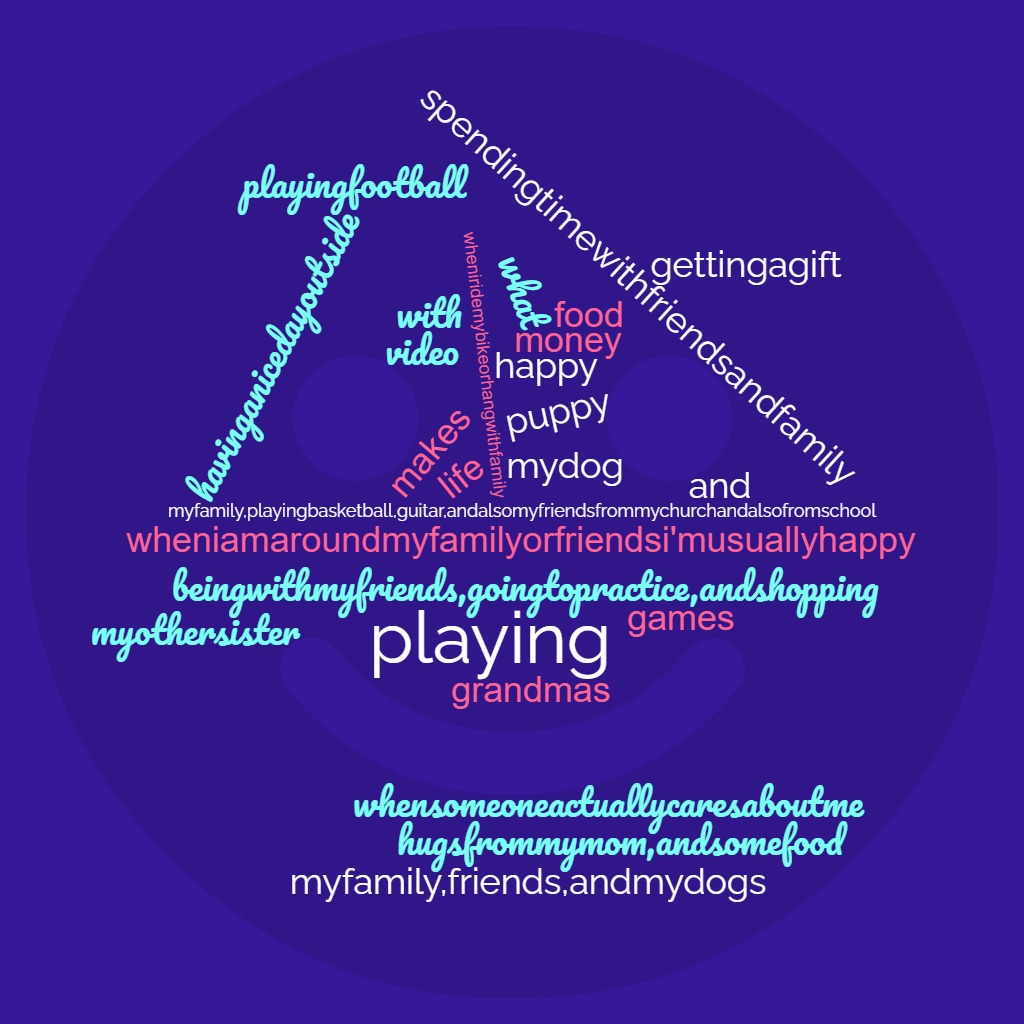
Global Concerns - What Matters to You

Community Concerns


School Concerns

Family Concerns


Worries


Loves


Thursday - Where to start - who wants to work together? what can you offer the team?
Get your ideas down, get a rough sketch of what the game might look like, sound like, feel like, play like

Click here to same your colleagues' game ideas - we'll talk about them and start to form groups


Friday -  Giving Thanks to a bunch of wonderful students


Extra Stuff to do if you are done:

View Info in Space Out Friday

_________________________________________

Period 3

Spike Robot Info

Monday - Dancing Robot Reflection 

Build your website portfolio

Tuesday - Build your website portfolio

Wednesday - Build your website portfolio

Thursday - 

Friday -  Giving Thanks to a bunch of wonderful students


P3 typing class link

Extra Stuff to do if you are done:

View Info in Space Out Friday
____________________________________________

Period 5

Everyday - Question of the Day - answer the question of the day on your Google Doc.  

Monday - Building a digital portfolio
Question - How do you make a peanut butter sandwich?

Tuesday - Building a digital portfolio
Question - How do you make an egg?

Wednesday - Building a digital portfolio
Question - How do you make your bed?

Thursday - Check your Question Doc - Noe & Angel need to give permission
All need to post a link to their Pong Game from Scratch!
Question - 

Friday -  Giving Thanks to a bunch of wonderful students
Question - 


Extra Stuff to do if you are done:

View Info in Space Out Friday

______________________________________________________

Period 6 & 7

Monday - Getting to know the class, log in, set up typing.com

Tuesday - Routines & NASA

Wednesday - Routines, bookmarks, & Tinkercad


Thursday - Tinkercad Starters

Friday -  Giving Thanks to a bunch of wonderful students


Extra Stuff to do if you are done:

View Info in Space Out Friday

_____________________________________________________

Space Out Friday


Sunday, November 6, 2022

RV Computer Science, Robotics, & ELD Week 11/7 - 10/2022

Aloha folks,

Welcome to the last week of Trimester 1!

Please make sure you talk to me or to your other teachers and make arrangements to turn in any late work.  I will accept late work until this Wednesday.

Periods 6 & 7

Make sure you give me any prints you need me to print.  Also, make sure you remove your Google accounts from any shared computer you have used in the Tech Lab.  You will be meeting your Trimester 2 teachers on Thursday.  It has been a pleasure working with you & getting to know you these last 3 months.  Good luck All!

___________________________________________________________

Period 2

CS Images

Monday - Building your Google Site Academic Portfolio

  1. Complete your homepage
  2. Change "Classes" to "Projects"
  3. Under the Projects folder, add the following subpages - Keyboarding, Laptop Disassembly/Reassembly, Game Design, Digital Portfolio, & Other
  4. Start working on the Keyboard Page
Tuesday -  Keyboarding Test - take 2 - 1 minute keyboarding tests.  Post them in your portfolio & write a reflection about your results.

 Wednesday -  Game Development Survey

Thursday -  End of Trimester 1 - Game Dev Rubric & platform

Friday -  Veteran's Day - Honor our Veterans

Video Resource for adding content to your website:

Project STEM Class Code for Periods 2  - ae32aa

Click here for typing.com class code - 


Extra Stuff to do if you are done:

View Info in Space Out Friday

_________________________________________

Period 3

Spike Robot Info

Monday - Finish organizing your Parts Box.  Start building & programming your Break Dancing Robot

Tuesday -  Finish Break Dancing Robot - This and your toolbox organization will be the last grade for trimester 1. 

Wednesday - Building Your Digital Portfolio - Google Sites -

Thursday - Break Dancing Robot Reflections 

Friday -  Veteran's Day - Honor our Veterans


Project STEM Class Code for Periods  3  - ae32aa

Click here for typing.com class code - 


Extra Stuff to do if you are done:

View Info in Space Out Friday
____________________________________________

Period 5

Everyday - Question of the Day - answer the question of the day on your Google Doc.  

Monday - Scratch Project - BUILD PONG GAME
Question - What's happening in the night sky in November?

Finish Pong game - add the following:
  • Set paddle position
  • Set pause & position of the ball
  • Create sounds - red line & ball?
  • Create start page
  • Create end page 
  • Level 2
Tuesday - Scratch Project - BUILD PONG GAME
Question - Write down a funny joke.

Wednesday - Scratch Project - BUILD PONG GAME
Question - 

Thursday - Scratch Project - BUILD PONG GAME
Question - What will you be doing this 3-day weekend?


What is Veteran's Day?


Friday -  Veteran's Day No School - Honor our Veterans
Question - 


Project STEM Class Code for Periods 5, 6, & 7  - 4387cc


Extra Stuff to do if you are done:

View Info in Space Out Friday

______________________________________________________

Period 6 & 7

Monday - Scratch Project - BUILD PONG GAME
  • Set paddle position
  • Set pause & position of the ball
  • Create sounds - red line & ball?
  • Create start page
  • Create end page 
  • Level 2

Tuesday - Scratch Project -BUILD PONG GAME

Wednesday - Scratch Project - BUILD PONG GAME

Thursday - Last day of CS - Meet your Trimester 2 teacher & class

Friday -  Veteran's Day - Honor our Veterans


Extra Stuff to do if you are done:

View Info in Space Out Friday

_____________________________________________________

Space Out Friday


Tuesday, November 1, 2022

RV Computer Science, Robotics, & ELD Week 11/1 - 4/2022

Aloha all,

Happy 1st week of November!

All groups will be working on their projects so it's getting busy.  Lot's to learn & discover, especially how to work and communicate with each other.  Let's do this with some respect and style:)

Unfortunately, I will not be here on Tuesday with you.  I am currently at Jury Duty.  Today may be my last day here or I may be placed on a case as a juror.  I won't know till Tuesday afternoon.

The guest teacher has your plans, you have the class blog with detailed instructions, and you are all smart enough to know how to act.  Be respectful to yourself and others.  Remember, if you get a negative comment on the guest teacher's notes, you will get lunch detention when I return.  

________________________________________

Period 2

Project STEM Class Code for Periods 2  - ae32aa

Click here for typing.com class code - 

Monday - No students


Tuesday -  Building your Google Site Academic Portfolio - WATCH THE VIDEO
  1. Complete your homepage
  2. Change "Classes" to "Projects"
  3. Under the Projects folder, add the following subpages - Keyboarding, Laptop Disassembly/Reassembly, Game Design, Digital Portfolio, & Other
  4. Start working on the Keyboard Page

 Wednesday -  Adding Content to your Google Site Academic Portfolio - Complete Tuesdays tasks

Thursday -  Adding Content to your Google Site Academic Portfolio

Friday -  


Extra Stuff to do if you are done:

View Info in Space Out Friday

_________________________________________

Period 3

Project STEM Class Code for Periods  3  - ae32aa

Click here for typing.com class code - 

Monday - No students


Tuesday -  Organize kits & Spike Tutorials - WATCH THE VIDEO
  1. Organize your teams toolbox
    1. Bags 1, 2, 3 - in box 1
    2. Bags 4 & 5 - in box 2
    3. Bags 6 & 7 - in box 3
    4. Bag 9 - in box 4
    5. All other parts in top compartment
  2. Finish Tutorial - Very important!
  3. Start building the Break Dancing Robot - watch the video 
  4. Code the Robot
  5. Dance off!

 Wednesday - Spike Tutorials & first build 

Thursday - First Build    

Friday -  First build demo


__________________________________________

Period 5

Everyday - Question of the Day - answer the question of the day on your Google Doc.  

Project STEM Class Code for Periods 5, 6, & 7  - 4387cc


Monday - No students
Question - 


Tuesday - Scratch Project - Chase Game - Art Editing - BUILD PONG GAME - WATCH THE VIDEO
Question - Do you play video games?  Which ones?

Wednesday - Scratch Project - Chase Game - Sprite Interaction - BUILD PONG GAME
Question - What is your favorite day of the week?  Why?

Thursday - Scratch Project - Chase Game - Putting it all together - BUILD PONG GAME
Question - Do you play games with your family? What kind of games?
Finish Pong game - add the following:
  • Set paddle position
  • Set pause & position of the ball
  • Create sounds - red line & ball?
  • Create start page
  • Create end page 
  • Level 2

Friday - Scratch Project - Chase Game - Finishing and game demo - BUILD PONG GAME
Question -  Are you comfortable in the dark?  Why or Why not?


Extra Stuff to do if you are done:

View Info in Space Out Friday


_____________________________________________

Period 6 & 7

Project STEM Class Code for Periods 5, 6, & 7  - 4387cc


Monday - No students


Tuesday - Scratch Project - Chase Game - Art Editing - BUILD PONG GAME - WATCH THE VIDEO

Wednesday - Scratch Project - Chase Game - Sprite Interaction - BUILD PONG GAME

Thursday - Scratch Project - Chase Game - Putting it all together - BUILD PONG GAME
  • Set paddle position
  • Set pause & position of the ball
  • Create sounds - red line & ball?
  • Create start page
  • Create end page 
  • Level 2

Friday - Scratch Project - Chase Game - Finishing and game demo - BUILD PONG GAME


Extra Stuff to do if you are done:

View Info in Space Out Friday


______________________________________________

Space Out Friday