Sunday, October 9, 2022

Rio Vista Computer Science, Robotics, & ELD Week 10/10 - 14/2022

Good Day all,

Here are the plans for the week. 

Homeroom Survey - Please click here

Period 2 & 3

Monday - Project Debrief
  • Get into your laptop teams & get your device
  • What questions do you have regarding how laptops/computers work?
  • What suggestions do you have about this project?
Tuesday - Presentations - Captivating your audience
Wednesday - Be a GOAT in Slides
On your own, bring up your Laptop Group slideshow.
Thursday - Building Your Student Portfolio 
  • Let's start by opening typing in slides.google.com in your omnibar or
Friday - Working on your Student Portfolio

Extra Stuff to do if you are done:
  • Coding is the way a computer knows how to do something.  Play the coding game linked below.  Look to learn how to give the bot instructions to reach it's goal.  This game can also be played in VR or AR.

OR

  • Learning AI - Artificial Intelligence is being used every day in many of the products we use like search engines, streaming music, & map location software like Google Maps or Waze.
  • Learn how to teach AI instead of programming.  Try the program below & have fun!

Robotics - try making this Mars Rover Simulation complete its task.  This is very similar to what you will be programming.


________________________________________________________________________
Period 5
Monday - Friday - Writing a Summary of a Video
  1. Watch these videos -  The Global Waste Problem  &   Recycling for Kids
  2. Discuss - What are the videos about?
    1. What parts did you find interesting?
    2. What did you not understand?
  3. Look at the picture below
  4. On your paper, begin writing to describe the picture
Key vocabulary -
  • reduce - use or do less of something
  • reuse   - use it again
  • recycle - make it into something else
  • sort      - put different things in different places where they need to be.


Describe a Picture Rubric


Play this Recycling Game


_________________________________________________________________________
Period 6 & 7

Project Identification Wrap-up

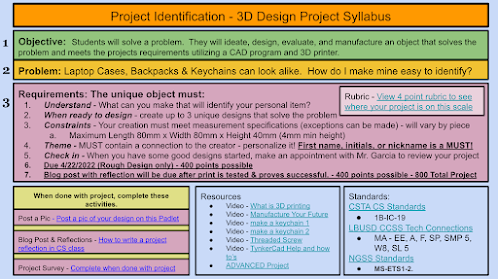
We will be wrapping up our project this week.  Get your designs finished and checked by Mr. G.  You can help by checking on the print on the bed to see how they are becoming real.  Just don't touch the print bed.  

Monday -
When your print is checked off by Mr. G, here are a couple of things you can do.

Everyone can do this:  Post a screenshot of your design on the Project ID Padlet.  Click on the image below to get there.

Tuesday - How Are Things Made? - 


Wednesday - Machines Run on Code

  1. Create an account in Scratch
  2. Add Scratch to your bookmarks
  3. Discover Scratch

Thursday - Discover Scratch with Mr. G

Friday - 

__________________________________________________________________________

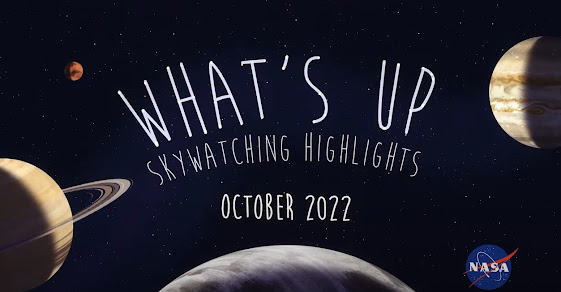
Space Out Friday


Insight Hears Meteors Hit the Surface of Mars


NASA Solar System Exploration


The Parker Solar Probe - The Fastest & Hottest Satellite in the Universe!


Shaded Earth Moon Spiral

Sunday, October 2, 2022

Rio Vista Computer Science, Robotics, & Eld Week 10/3 - 7/2022

 Hello everyone,

Happy first week of October.  Lots's to this week so let's get started

Period 2 & 3

Click here for the Project Laptop Disassemble/Reassemble Scoring Rubric Guide

Monday - Review presentation setting & logistics.  Finish Slideshow & practice
Tuesday - Begin presentations - 2 per day
Wednesday - Presentations
Thursday - Presentations
Friday - Presentations

Extra Stuff to do if you are done:
  • Coding is the way a computer knows how to do something.  Play the coding game linked below.  Look to learn how to give the bot instructions to reach it's goal.  This game can also be played in VR or AR.

OR

  • Learning AI - Artificial Intelligence is being used every day in many of the products we use like search engines, streaming music, & map location software like Google Maps or Waze.
  • Learn how to teach AI instead of programming.  Try the program below & have fun!

Robotics - try making this Mars Rover Simulation complete its task.  This is very similar to what you will be programming.


________________________________________________________________________
Period 5
Monday - Let's take a break from testing and try some dancing, AKA Dance Party!


Tuesday - We'll continue finishing your testing until you are done.  When done, work on your Dance Party!

Wednesday - Testing in Elit

Thursday - Testing in Elit

Friday - Dance Party Dance Off!


_________________________________________________________________________
Period 6 & 7

Project Identification

We will be wrapping up our project this week.  Get your designs finished and checked by Mr. G.  You can help by checking on the print on the bed to see how they are becoming real.  Just don't touch the print bed.  

When your print is checked off by Mr. G, here are a couple of things you can do.

Everyone can do this:  Post a screenshot of your design on the Project ID Padlet.  Click on the image below to get there.


What is 3D Printing?  Click on the image below to watch the following videos & read the interesting articles


What is 3D Printing


Building Homes May Help People


25 (Unexpected) 3D Printing Use Cases


_________________________________________________________________________
Space Out Friday


Insight Hears Meteors Hit the Surface of Mars


NASA Solar System Exploration


The Parker Solar Probe - The Fastest & Hottest Satellite in the Universe!


Shaded Earth Moon Spiral


Monday, September 26, 2022

RV Computer Science, Robotics, & ELD Week 9/26 - 30/22

 Hi all,

The last week of September has come.  We'll be finishing several projects & starting new ones so keep watching for updates on this blog.

Space Note:

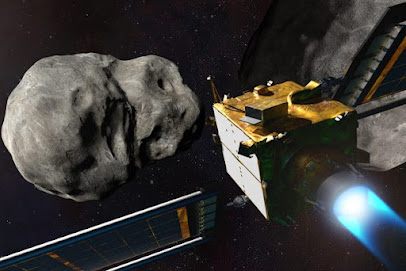
DART Project finishes on Monday.  Watch the end of the first part of the mission here.


Period 2 & 3

We'll be finishing our laptop project this week.

  1. Reassemble your laptop and check to make sure it works.  Troubleshoot any problems.
  2. Put together your slideshow paying close attention to the parts and what they do.
  3. Find the rubric for your slideshow here.
Search for your tool names at the link below.


Period 5
Monday - Review Videos & writing.  Finish if needed

Tuesday - We'll be logging into our new on-line program today.

Method 1 -

1. Click on this link to get to Clever

2. Find, heart, & click on this link

3. Look for your new Task


_______________________________________________________________________


Method 2 - 

1. Click on the link below

2. Click on the Sign in button on the upper right side & click on Teacher Student button

3. Go to the box shown below & type in Rio Ele...  click on Rio Elementary

4. Click the "Sign in with your school district" button

5. You are in.  Look for your first assignment.


Wednesday - Testing in Elit

Thursday - Testing in Elit

Friday - Testing in Elit & Rootbeer Floats


Period 6 & 7

Project Identification will continue this week.  I will be meeting with each of you this week to answer questions and review your projects.  

We will also be looking at measurement & the metric system and how it relates to your project.


From the Miramar Air Show


Sunday, September 18, 2022

RV Computer Science, Robotics, & ELD Week 9/19 - 23/22

Welcome Folks,

As a school, we will be celebrating Internation Day of Peace on Wednesday.  There will be many activities.  But what is peace and what does it look like?


Monday

View the video on your own.  As a class, watch the video again & discuss the questions below.

Internation Day of Peace Sept 21, 2022 


What can we do to make peace?  Watch this video.


What do people in this video do to make peace & show kindness to each other?


Is it difficult to show kindness to others?


What can you do to show kindness & peace?


It all starts with our breathing!  Do the following activity as a whole class.

Tuesday

How did the International Day of Peace begin?


Do you think peace is possible?

...in the world?

...in our country?

...in our city?

...in our school?

...in our homes?


Period 2 & 3

Do the Peace Day activities first, then start on your project below.

Laptop Project - It's time to put it all back together and make it work. 

Goals for this week:

  1. Reassemble your laptop computer and check to see if it works
  2. Build your Laptop Project Slideshow including notes, images, and descriptions of how you did this & what you learned.

Do the following daily

  1. Review your jobs with your team, change them as needed
  2. The Recorder should remind the group using their notes as to where they left off last week.  Use your notes to go backward for the reassembly.  
  3. Take an inventory of your tools before and after you use them.
With your group:
  1. Start reassembling your device - Watch this for a 30 seconds - when tightening screws on any part that has more than one screw - tighten in a star pattern not one side at once!
  2. Keep detailed notes and images
  3. Use tape & a sealed container to keep track of your parts and where they go.
  4. Take pictures of the reassembly process.
  5. Here is a link to the image below so you can name the parts


Other Resources
These resources are great to watch but will take extra time.  You can watch these at home if you are interested.


Slideshow Master Copy - click on "Make a Copy"  You will only need one presentation per group.  You need to share it so you can all work from the same copy


______________________________________________________________________________


Periods 5

English
1. Watch 2 of the following videos
2. Answer the questions on the answer page about the video.  Answer a page for each video.
3. On the back, draw what you are thinking about.

Espanol
1. Mira 2 de los videos abajo.
2. Contesta las preguntas sobre el video en la pagina. Llena un pagina para cada video.
3. Atras de la pagina, dibuja sobre los que piensas del la informacion del video

Videos in English

Mexican-born engineer pushing for more diversity in space


How an immigrant farmworker beat the odds to become a NASA astronaut


Videos en Espanol

Katya Echazarreta, la primera mexicana en viajar al espacio


De los campos a la NASA, la historia del astronauta mexicano José Hernández


Extra - Just for Fun


How does the International Space Station work?


_________________________________________________________________________________


Periods 6 & 7
 
Do the Peace Day activities first, then start on your project below.

You will be starting your new 3D Design project, Project Identification, today

Key Vocabulary:
*Manufacturing
*Additive
*Automation

Design 3 different ideas that you can put on your backpack or keychain that will show that it belongs to you.  Follow the guide below.


_________________________________________________________________________
Space Out Friday

Who works for NASA?


Project Artemis - What is it?

Why Are We Going To The Moon? Click on the image